Open the inside cover of your Livescribe Dot Paper product
and locate the Settings area.
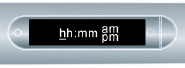
In your notebook, tap the Set Time button with the smartpen.
Tap the printed Settings keypad
and enter the time as “hh:mm” format. Tap the “AM” or “PM” button to
select AM or PM. For example, to enter 12:01PM, tap “1,” “2,” “0,”
“1,” and the “PM” button.
If you make a mistake, entering the time, simply tap on
the Set Time buttons again to start over.

 with the smartpen.