You can start and stop a recording without paper.
-
Use the
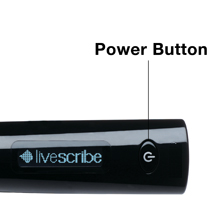
Quick Record feature. With the smartpen on,
press and hold the power button for approximately five (5) seconds until the
screen shows that recording is started.
The smartpen may appear to power off until it shows the recording
started indicator.
Important: Release the power button immediately upon
seeing the REC symbol on your smartpen screen. If you hold the button too long,
you'll power the smartpen off.
-
To stop recording quickly, press the smartpen power button. You
can also tap the
Stop button
 on any Livescribe Dot Paper.
Note: Quick Record launches Paper Replay. If you write on Livescribe Dot
Paper after starting the recording with Quick Record, your notes are linked
with the audio, as usual.